
Live Anime Shimeji Screen Pets
Neko SoftPersonalization
4.7178.00 Reviews
- Version
- 1.1.9
- Installs
- 500.00K
- Age Rating
- Everyone
Screenshots
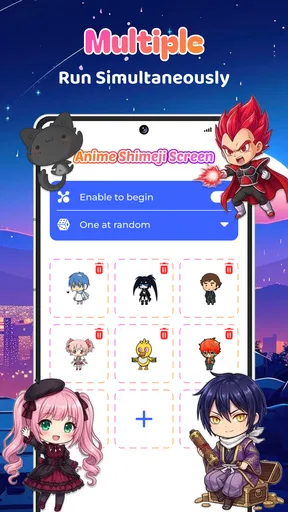
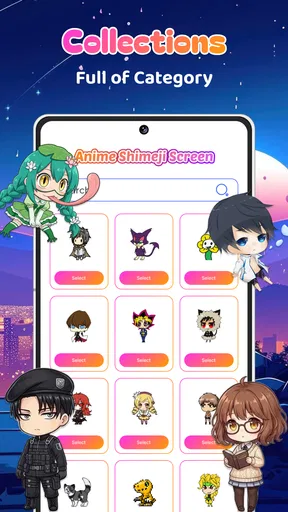
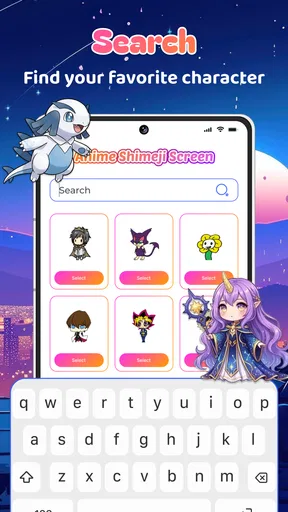
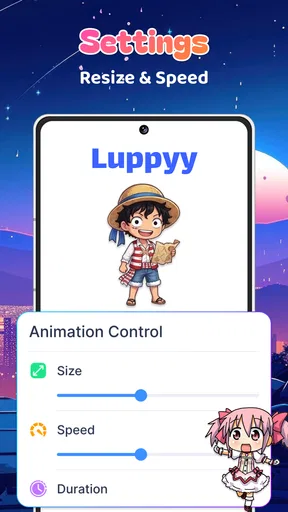
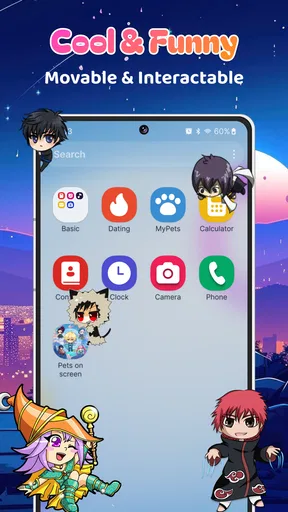
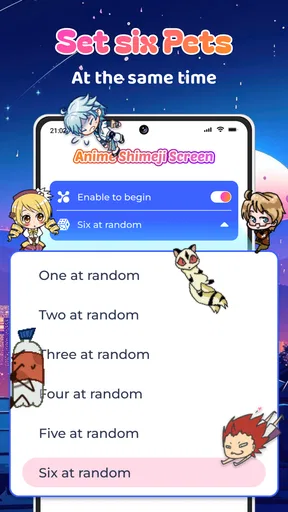
Our Review of Live Anime Shimeji Screen Pets
 Analysis by Appyee
I found Live Anime Shimeji Screen Pets interesting because it treats phone personalization as something active rather than static. Instead of only changing a wallpaper or icon set, it adds small anime-style companions that move around the screen. That makes the phone feel more playful, although it also means the experience depends heavily on how comfortable you are with motion, visual activity, and an extra layer over your usual interface.
This is a free personalization app from Neko Soft, rated for Everyone. It has reached over 500 thousand installs and holds a 4.7 average from around 9 thousand ratings, which suggests that the basic idea connects with a sizeable audience. I tested it with a practical question in mind: does the novelty remain enjoyable after the first few minutes, and can people with different visual, motor, sensory, or situational needs use it without unnecessary frustration?
How the pets change the way the phone feels
The central appeal is simple. Cute animated characters roam across the phone screen while I use other apps. They are not a replacement for a launcher, a messaging tool, or a game. They are an expressive layer on top of an ordinary phone, turning idle moments and routine screen checks into something a little more personal.
That distinction matters when deciding whether to install it. If you want a clean home screen, a carefully arranged widget layout, or a distraction-free work device, moving characters may feel intrusive. If your phone feels visually dull and you enjoy anime-inspired decoration, the same behavior can make it feel more like your own space.
The app’s store summary describes interactive anime Shimeji pets roaming the screen, and that is the right way to understand the product. I would not approach it expecting a deep virtual-pet simulation with a long progression system. Its value is in the presence of the characters and the small moments of interaction, not in replacing a full game.
Because the app is free to download, it is easy to try without committing money at the start. There are in-app purchases ranging from a few dollars to higher-priced individual items, so I would look carefully at what is included before buying anything. The free entry point is useful for testing whether the movement and visual style suit you, rather than assuming that every available character or customization is included.
Readability and navigation in everyday use
The most important readability issue is not text size inside the app; it is the contrast between a moving pet and whatever is already on the screen. A character crossing near an icon, a button, or a line of text can briefly compete for attention. I found that harmless during casual browsing, but more noticeable when I was trying to read quickly or tap a precise control.
This makes the app easier to live with when I treat it as decoration rather than something that should always demand attention. I prefer checking the phone normally and letting the pet remain in the background. Users who enjoy watching every movement may find the animation charming, but users who need a stable visual field may want to reduce their exposure or remove the overlay before focused tasks.
Navigation is also shaped by the fact that the pets occupy the same visual space as the rest of the phone. Even when they are small, motion naturally attracts the eye. That can make the interface feel less predictable for someone who relies on consistent visual landmarks. A static wallpaper or a non-animated icon pack is a better alternative when the main goal is fast recognition and low cognitive load.
One useful habit is to separate personalization from productivity. I would keep the pets active while relaxing, listening to music, or casually checking messages, then switch to a quieter setup before reading long documents, filling out forms, or handling work. This simple routine preserves the fun without allowing the decoration to interfere with tasks that depend on concentration.
The current version is 1.1.9, and the app supports Android 7.0 and later. That broad system range makes it relevant for people using older phones, but the experience can still vary with screen size, performance, and the way a particular device handles visual layers. I would judge it on the actual phone rather than assuming that a compatible operating system guarantees an equally smooth experience everywhere.
Motor and sensory considerations
For motor access, the key question is how much direct interaction you want. A moving character can be entertaining to watch without requiring constant tapping, which is helpful for someone who prefers passive personalization. The app can therefore add personality without turning the phone into another task that demands repeated gestures.
At the same time, interactive screen pets may encourage extra taps, drags, or attempts to follow a character. That can be awkward for people with reduced precision, tremors, fatigue, or difficulty making small gestures. I would avoid treating the pets as targets that must be caught or managed perfectly. Their presence works best when interaction is optional and casual.
For users sensitive to motion, the animation is the main concern. Characters crossing the display create continuous movement, and even cute movement can become tiring during a long session. Someone who experiences discomfort from animated interfaces may prefer a static personalization app. This is not a criticism of the concept; it is a reminder that the feature that makes the app distinctive is also the feature most likely to exclude some users.
Visual clutter can matter for people with attention-related needs as well. The pets may provide a pleasant focal point during a break, but they can also pull attention away from a notification, keyboard, or navigation control. I would be especially cautious about using the app on a phone shared with a child or on a device used for study, where playful movement may compete with the intended activity.
Audio is not the central reason to install this app, so people who want a quiet experience may find it more suitable than a heavily sound-based personalization tool. Still, I would not assume that visual comfort alone solves every sensory concern. The safest approach is to try it briefly in the environment where the phone is normally used and notice whether the animation feels calming, neutral, or tiring.
There is also an emotional accessibility angle. A small character on the screen can make a phone feel warmer and less impersonal, especially for someone who enjoys anime art or likes gentle visual companionship during routine activities. That benefit is subjective, but it is real: personalization is not only about appearance. It can influence whether opening the phone feels inviting or purely functional.
Situational access at home, work, and outside
In a relaxed home setting, the app makes the most sense. I can let a pet wander while checking messages, waiting for a video to load, or taking a short break. The feature has room to be playful because I am not asking the phone to remain visually restrained. This is where the app feels more distinctive than a wallpaper, which changes the mood but does not create any ongoing presence.
Work and study are different. A moving pet may be fine during informal communication, but it can become a distraction during writing, reading, navigation, or a video call. I would not recommend leaving it active by default if the phone is an important work tool. The better workflow is to enjoy the personalization during downtime and use a simpler screen arrangement when accuracy and sustained attention matter.
Public settings introduce another consideration: visibility. Anime characters moving across the display are noticeable, and not everyone wants their phone to attract attention in a classroom, meeting, waiting room, or public transport. This is not a technical barrier, but it affects social comfort. A user may enjoy the app privately and still choose not to use it in situations where a discreet appearance is preferable.
Battery and performance are practical concerns whenever animation remains present while other apps are open. I would pay attention to how the phone behaves during a normal day, especially on older hardware. If the device already struggles with multitasking, the extra visual activity may not be worth the trade-off. A static theme is the safer choice for conserving a simple, predictable phone experience.
Another realistic use case is personalization for a secondary device. On an older phone used mainly for music, casual browsing, or a child-friendly home environment, the pets can add character without interfering with a primary work device. That arrangement also makes it easier to keep the app for leisure while preserving a calm, uncluttered setup where important tasks happen.
The Everyone content rating makes the app approachable for a broad audience, but age suitability is not the same as universal comfort. Younger users may enjoy the characters immediately, while adults may prefer them as a lighthearted decoration. For a child, I would still supervise purchases and device use, particularly because optional items can cost from $2.99 to $14.99 each.
Where the experience still has barriers
The biggest barrier is the absence of a clear reason for someone who does not already like animated personalization to keep it installed. A static wallpaper changes the appearance once and then disappears into the background. These pets remain part of the visual experience, so the user has to accept their movement as an ongoing trade-off.
Another barrier is precision. Even if the app is enjoyable without constant interaction, anyone expecting reliable control over a moving character may find the experience less comfortable than a conventional game with fixed buttons and predictable targets. I would not choose it for users who need highly structured interaction or a clear task-based interface.
There is also a difference between being visible and being readable. A character can be cute, well drawn, and visually appealing while still making a busy screen harder to scan. People who use large text, magnification, strong contrast, or screen readers should evaluate the app alongside their usual phone settings rather than assuming that personalization will remain separate from accessibility needs.
For screen-reader users, the important question is whether the animated layer adds meaningful information or simply visual decoration. Since the pets are primarily an appearance and interaction feature, they may offer little benefit to someone who does not see the screen. In that situation, a tool that improves audio feedback, organization, or text accessibility would be a more useful investment of attention and money.
Purchases deserve a cautious approach too. The free version lowers the risk of trying the concept, but optional items can change the overall cost if collecting different pets becomes part of the appeal. I recommend using the free experience long enough to decide whether the animation fits your routine before spending on extras. That is particularly important for families and anyone managing a tight app budget.
Finally, the app is not the right answer for every personalization goal. If you want deep control over colors, icon shapes, widgets, or layout, a launcher or theme tool will probably offer more practical customization. If you want a character-driven experience with missions, progression, or a richer game loop, a dedicated virtual-pet game is likely a better match. This app occupies a narrower space: animated companionship on the phone screen.
My inclusive verdict after using it
I see Live Anime Shimeji Screen Pets as a charming but deliberately niche personalization app. Its strength is immediate personality. The phone feels less static, and anime fans or anyone who enjoys small visual surprises may find that the pets make ordinary screen time more pleasant. The free starting point also makes experimentation straightforward.
My recommendation depends on context. I would suggest it to someone who wants a playful Android screen, does not mind ongoing motion, and is comfortable treating the pets as optional decoration rather than a serious game. I would also suggest trying it on a secondary device if the main phone is used for work, reading, navigation, or other tasks where visual stability matters.
I would skip it for someone sensitive to movement, easily distracted by animated elements, dependent on a highly predictable interface, or looking for comprehensive theme controls. In those cases, a static wallpaper, icon pack, or accessibility-focused customization tool is likely to be more comfortable and useful.
The most inclusive way to use it is to make the animation serve your routine, not control it. Keep the pets for relaxed moments, remove visual competition when concentration matters, and treat purchases as optional rather than necessary. That approach preserves the app’s personality while acknowledging that the same motion that delights one user can exhaust or distract another.
Overall, I enjoyed the idea more as a mood-setting layer than as an everyday essential. Neko Soft has created something easy to understand and visually distinctive, but its success depends on personal tolerance for movement and screen activity. If that style matches you, this free personalization app can make a familiar phone feel surprisingly lively. If accessibility, focus, and predictability come first, a quieter alternative will serve you better.
Verdict
Strengths of Live Anime Shimeji Screen Pets
- Cute anime characters add personality to your home screen.
- Pets move around while you use other apps without interrupting them.
- Several character styles offer variety for different anime preferences.
- Simple controls make it easy to show, hide, or reposition pets.
- Light entertainment that can make routine phone use more enjoyable.
Limitations of Live Anime Shimeji Screen Pets
- Animated overlays may consume extra battery during extended use.
- Some characters or features may require in-app purchases.
- The overlay permission can concern users focused on privacy.
- Pets may occasionally cover buttons or text in other applications.
- Performance can vary on older phones or devices with limited memory.
Similar Picks in This Category
View All
Microsoft SwiftKey AI Keyboard
SwiftKey4.3

Wallpapers
Google LLC4.1

Zedge™ Wallpapers & Ringtones
Zedge4.7

Yandex Browser with Alice AI
Direct Cursus Computer Systems Trading LLC4.3

Ringtone Maker:create ringtone
Big Bang Inc.4.7

Fonts Keyboard
Fonts Keyboard3.9
Frequently Asked Questions
What is Live Anime Shimeji Screen Pets?
Live Anime Shimeji Screen Pets is a customization app that places animated anime-style characters on your phone’s screen. These small virtual pets can walk, jump, climb, and interact with elements on the display while you use other apps. It is mainly designed for entertainment and personalization, giving your Android or iOS device a more playful appearance without changing the phone’s main interface.
How do I add an anime character to my screen?
After installing the app, open it and choose one of the available anime characters or pets. You may need to grant permission for the app to display over other applications, depending on your device and operating system. Once permission is enabled, select the character and activate it. The pet should then appear as a movable overlay that remains visible while you use compatible apps.
Does Live Anime Shimeji Screen Pets affect phone performance or battery life?
Because the app displays animated characters continuously, it may use additional battery, memory, and processor resources, especially when several pets are active at the same time. On newer devices, the impact is usually manageable, but older phones may experience slower performance or faster battery drain. Reducing the number of characters or disabling animations can help improve efficiency.
Is the app safe to use, and what permissions does it require?
The app may request overlay or display-over-other-apps permission so its characters can appear above your home screen and other applications. This permission is necessary for the main feature, but users should review the app’s requested access before accepting it. Downloading from an official app store, checking the privacy policy, and avoiding unnecessary permissions are recommended for safer use.
Is Live Anime Shimeji Screen Pets free, and does it include advertisements or purchases?
The app may be available as a free download, but some characters, customization options, or extra features can be restricted behind advertisements, in-app purchases, or premium versions. The exact offer may vary by platform, region, and app update. Before downloading, check the store listing for current pricing, subscription details, advertising information, and any purchase requirements.
